
AI Remodel - Interior Design
PulseApps Solutions OÜHouse & Home
4.61.07K Reviews
- Version
- 1.38.1
- Installs
- 5.00M
- Age Rating
- Everyone
Screenshots
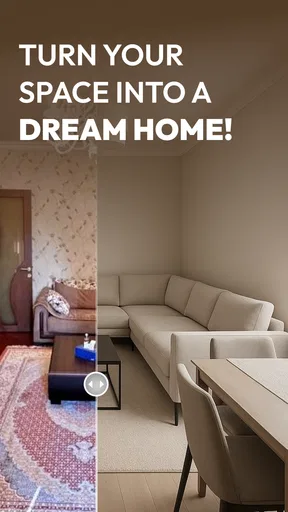
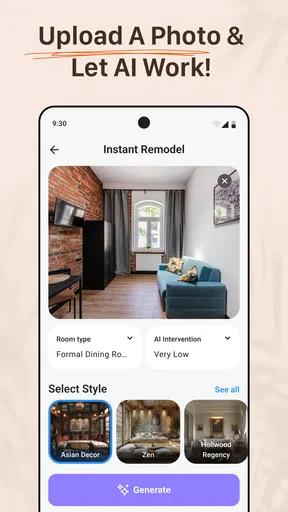
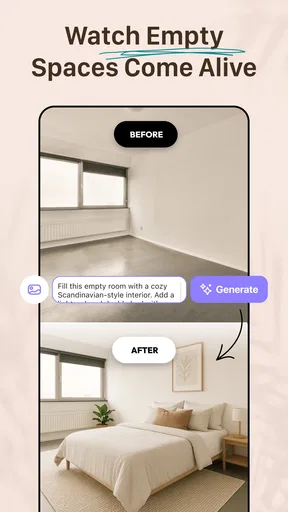



Our Review of AI Remodel - Interior Design
 Analysis by Appyee
Have you ever found yourself staring at your living room and thinking, "Man, this place needs a makeover!"? That’s the problem AI Remodel - Interior Design is meant to tackle: turning a vague wish for a different-looking room into something you can explore before committing to paint, furniture, or a larger project. I’d treat it as a starting point for decisions, not as a substitute for measuring carefully or talking to a contractor.
That distinction matters because home design apps can serve very different needs. Some are mainly mood boards, some are precise floor-plan tools, and some help you picture a visual change. This app sits in the AI-assisted home renovation space, where a room image can help you consider possible directions. It is most useful when you know something feels off but have not yet worked out what to change.
Choose it for visual exploration, not technical plans
Before deciding whether to use it, I’d ask what you need from a design tool. If you want quick inspiration for a room, an AI-led approach can help you compare a few possible looks without first learning a complicated design program. If you need exact dimensions, construction drawings, or a reliable bill of materials, a dedicated planning tool or a professional will be a better fit.
That makes the app a sensible choice for early-stage thinking: a renter weighing whether a room would feel warmer with a different palette, a homeowner collecting ideas before speaking with a tradesperson, or someone trying to make a spare room more useful. It is less suitable when the main challenge is structural, such as moving plumbing or confirming whether a wall can be removed. A visual concept can start a conversation, but it cannot establish whether a renovation is safe or feasible.
The app is listed as a free House & Home app from developer Dmytro Bubela, with a 4.5 average from around 37,000 ratings and over a million installs. It is rated for everyone, and the current version is 1.18.1. Those figures suggest a widely used tool, but they don’t tell me whether any particular design will suit your room; your own judgment still has to do that work.
Where AI Remodel can help—and where it needs a reality check
The first thing you’ll notice when you download AI Remodel - Interior Design is how user-friendly it is. Setting up the app is a breeze; you just need to snap a few pictures of the room you want to remodel. The app uses AI to analyze your space, and before you know it, it's offering suggestions that are both stylish and practical.
Features That Stand Out
One of my favorite things about this app is its versatility. Whether you're looking to simply rearrange your furniture or go for a complete overhaul, this app has got you covered. Here are some features that really caught my eye:
- Virtual Reality Previews: You can see how your room will look with proposed changes in stunning VR. It’s like stepping into the future of your own home.
- Personalized Suggestions: The app learns your style preferences over time, offering custom-tailored advice that feels like it's coming from a designer who knows you well.
- Material and Color Recommendations: From wall colors to fabric textures, AI Remodel suggests materials that complement your existing decor.
The ability to preview different styles and layouts without lifting a finger is a game-changer. It's like playing The Sims, but with real-life implications! I’d use those previews to narrow down a direction, then check every idea against the room’s actual dimensions, the furniture I plan to keep, and the amount of work I’m willing to take on. A polished image can make a layout feel more practical than it is, so I wouldn’t use an attractive preview as proof that a sofa will fit or a walkway will stay clear.
A useful workflow for a real room
For a more helpful result, I’d start with one clear question rather than asking the app to solve the entire home at once. For example: “Could this bedroom feel calmer without replacing the bed?” A focused prompt makes it easier to judge whether a suggestion solves the problem, while a broad makeover brief can leave you with appealing images that are hard to turn into a shopping or DIY plan.
Before taking a room photo, I’d clear small clutter from the floor and make sure the main pieces are visible. That is not about staging the room to look perfect; it is about giving the design suggestions a fair chance to reflect the layout. I’d also take a second picture from another angle if the first view hides a doorway, window, or awkward corner. Then I’d compare the ideas and note what stays constant across them. Repeated suggestions can be more useful than a single dramatic concept.
Once you have a direction, keep a short list of decisions the visual cannot settle: exact wall measurements, clearance around doors, whether existing electrical outlets are in useful places, and whether a proposed finish can handle the room’s everyday use. This turns the app into a practical briefing aid. You can take the chosen direction to a store, a DIY project, or a professional and ask more specific questions instead of trying to explain a vague feeling.
Using AI to Transform Your Space
Once you’ve got the hang of it, using the app becomes second nature. The AI engine behind the app is truly impressive. It considers the size of your room, natural lighting, and even your existing furniture to suggest the best possible arrangements and design elements. I was particularly impressed with how it utilized the awkward corner in my living room, turning it into a cozy reading nook.
That kind of suggestion is most valuable when it gives you a new way to think about space you have stopped noticing. A corner might become a reading spot, a work area, or simply a place to keep circulation open. I’d still check whether the idea matches how the room is used at different times of day. A chair beside a bright window may look inviting, for instance, but glare or a nearby walkway could make it less comfortable in daily life.
Another standout aspect is the app's ability to suggest local retailers for purchasing recommended items. This feature not only saves you time but can potentially save you money by finding the best deals nearby.
I would treat retailer suggestions as a research shortcut, not a final buying decision. Before purchasing, compare dimensions, materials, delivery arrangements, and return terms with the actual product information. A recommended item may convey the right style but still be the wrong size or finish for your room. If you already own furniture you want to keep, check the proposed palette against those pieces first; replacing less than the whole room is often the more realistic route.
Comparing it with other ways to plan a makeover
Compared with browsing inspiration boards, an AI room tool is more directly tied to your own space. Inspiration boards are good for collecting colors, styles, and examples, but you have to do more work to imagine how they will translate into your room. Here, the room image gives the ideas a more personal context. The trade-off is that a visual suggestion can be less dependable than a measured plan, so I see the two approaches as complementary rather than interchangeable.
Compared with a manual floor-plan or interior-design app, this kind of tool is likely to feel more immediate for visual experimentation, while a dedicated planner is the stronger choice when measurements and precise placement are central. A professional designer brings judgment about constraints, materials, and coordination that an AI preview cannot replace. For a small cosmetic refresh, the app may help you decide what to discuss or try; for a major renovation, I’d use it to collect ideas and then rely on qualified advice for the decisions that affect safety, cost, and construction.
Streamlining the Design Process
For those of us who find the idea of interior design intimidating, AI Remodel - Interior Design simplifies the process considerably. Instead of spending hours poring over magazines or Pinterest boards, you get instant access to design ideas that would take a professional weeks to curate.
The app also includes a handy budgeting tool that helps you keep track of your expenses. You can set a budget limit, and the app will ensure that all its suggestions stay within that range. No more nasty surprises when you check your bank account after a home makeover!
I’d use that budget feature as a guardrail for planning rather than a guarantee of the final spend. Renovation costs can involve more than the visible items in a design: delivery, tools, preparation, and unexpected work can all affect the total. A useful habit is to separate “must buy” items from optional finishing touches, then leave room in your own plan for costs the visual concept cannot account for. That keeps an attractive idea from quietly turning into an unrealistic shopping list.
Costs, commitment, and switching tools
The app is free to download, with in-app purchases ranging from $5.99 to $49.99 per item. I’d begin with the free experience and decide whether its suggestions genuinely help me make a choice before paying for anything. If you only need one quick burst of inspiration, a paid purchase may not be worthwhile; if you find yourself returning to it as you work through several rooms, you can judge the value against that continued use.
Switching later is not especially complicated if you treat each design as inspiration rather than as a project file that must become the final plan. Save the ideas that matter in your own notes, record measurements separately, and keep a list of products or finishes you want to check. That way you can move to a floor-plan tool, a mood board, or a conversation with a designer without losing the reasoning behind your choices. The main cost of switching is the time spent re-creating a visual direction, so write down what you liked and why while it is fresh.
A realistic use would be a Saturday refresh of a living room that feels crowded. I’d photograph the room, ask for ideas that preserve the sofa and main storage, and compare whether the space feels better with a different arrangement or a lighter visual scheme. After choosing a direction, I’d measure the available floor area, check walking routes, and price only the changes I actually plan to make. That process uses the app to answer the first question—what might work?—without letting an appealing picture decide the whole project.
An App for Everyone
Whether you’re a design novice or a seasoned DIY enthusiast, this app offers something for everyone. It’s perfect for anyone looking to make informed, creative decisions about their living spaces without the stress and cost of hiring a professional interior designer.
In practice, I think it is especially helpful for people who want a visual nudge before making modest changes, and for DIY-minded users who already know how to verify measurements and materials. I’d be more cautious recommending it to someone who expects exact technical plans, needs a contractor-ready specification, or wants the AI to make every decision. It is also not the best fit if you already have a clear design and simply need a precise way to document dimensions; a planner built around measurements would better match that job.
I also appreciated the app’s community feature, where users can share their design triumphs and challenges. It’s a supportive space that offers inspiration and tips from people who’ve been in your shoes.
Community ideas can be a useful source of perspective, especially when you are stuck between two styles, but I’d judge them in the context of your own room and habits. A setup that works for another household may not suit your storage needs, light, or daily routine. I’d borrow a detail—such as a color pairing or a way of using a corner—rather than assume another person’s whole design will transfer neatly.
Who should give it a try
If you’re ready to take your home from drab to fab, give AI Remodel - Interior Design a try. It’s more than just an app; it’s like having a creative partner that’s always ready to help you make your home feel more like, well, home.
My recommendation is to use it as a visual decision aid: explore a few directions, keep the ideas that fit your real needs, then verify them with measurements and practical checks. It makes the most sense when you are at the “I know this room could work better” stage and want a low-friction way to imagine alternatives. If you need certainty about construction, exact fit, or a complete professional plan, pair it with a more technical tool or expert help instead. Used with that boundary in mind, it can make the first step toward a room refresh feel much less daunting.
Privacy and Permissions
See what permissions an app requests and how it handles your data.
- Photos/Media/Files
- read the contents of your USB storage, modify or delete the contents of your USB storage
- Storage
- read the contents of your USB storage, modify or delete the contents of your USB storage
- Camera
- take pictures and videos
- Other
- view network connections, full network access, control vibration, prevent device from sleeping, Google Play license check
Verdict
Strengths of AI Remodel - Interior Design
- User-friendly interface for easy navigation.
- Offers a variety of design templates.
- High-quality 3D visualizations.
- Quick rendering of design changes.
- Supports collaboration with other users.
Limitations of AI Remodel - Interior Design
- Limited free features in basic version.
- Occasional lag with complex designs.
- Requires strong internet connection.
- Some design templates are paid.
- In-app purchases can be pricey.
Similar Picks in This Category
View All
Universal TV Remote Control
CodeMatics Media Solutions3.9

AlfredCamera Home Security app
Alfred Systems Inc.4.7

Planner 5D: AI Home Design
Planner 5D4.5

Universal Tv Remote-Cast to TV
One Music Player4.1

Zillow: Homes for Sale & Rent
Zillow Group4.8

99acres Buy/Rent/Sell Property
infoedge.com4.3
Frequently Asked Questions
What is AI Remodel - Interior Design?
AI Remodel - Interior Design is a cutting-edge app that utilizes artificial intelligence to help users redesign their living spaces. By simply uploading photos of your rooms, the app generates design suggestions tailored to your preferences, offering a virtual glimpse into potential home improvements.
How does AI Remodel work?
AI Remodel uses advanced AI algorithms to analyze your room photos and suggest design changes. It considers factors like lighting, color schemes, and furniture placement to provide personalized design recommendations. Users can explore different styles and layouts to see what best fits their taste and space.
Is AI Remodel suitable for professional designers?
While AI Remodel is user-friendly and ideal for homeowners looking for inspiration, it also offers features beneficial for professional designers. The app provides detailed design insights, allowing professionals to visualize and communicate ideas effectively with their clients, making it a versatile tool for all levels.
Can I save and share my design ideas with others?
Yes, AI Remodel allows users to save their favorite design ideas and share them with friends, family, or clients directly from the app. This feature makes collaboration easy and helps in gathering feedback before making real-world changes to your interiors.
Is AI Remodel available for both Android and iOS devices?
AI Remodel is available for download on both Android and iOS platforms. Users can find the app on the Google Play Store and Apple App Store, ensuring compatibility with a wide range of smartphones and tablets to reach a diverse audience.
